The Short Version
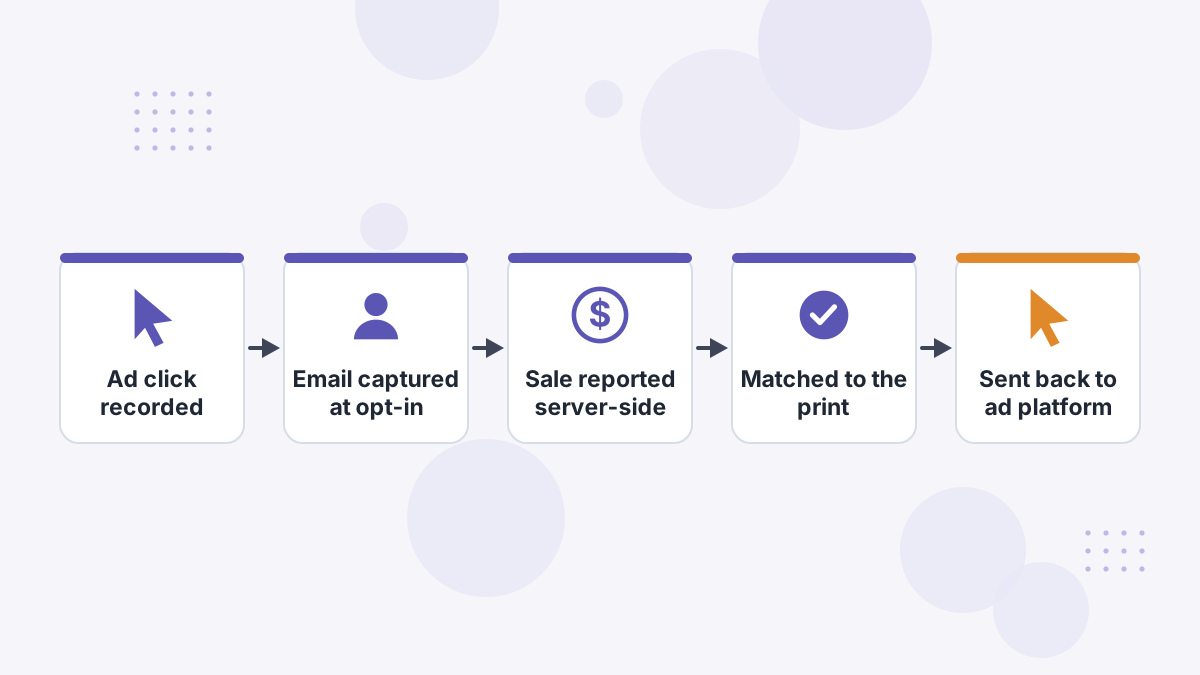
Hyros places a tracking script across your site that records where each visitor came from. When that visitor gives you an identifier, usually an email at opt-in, Hyros ties their whole history to it.
Later, when a sale, booked call or subscription happens, your checkout, payment processor or CRM reports it to Hyros directly. Hyros matches that conversion to the visitor's history and credits the right ads. Then it sends the matched sale back to the ad platforms.
Hyros calls the collection of identifiers for each visitor a "print", which is where the name print tracking comes from. The rest of this page unpacks each step.
Step 1: The Tracking Script Builds a Print
You install Hyros's universal script in the header of every page you control: landing pages, opt-in pages, sales pages, checkout and thank-you pages. Each time someone lands, the script records signals about the visit.
According to Hyros, those signals include the ad platforms' click IDs (such as Meta's fbclid, Google's gclid and TikTok's ttclid), referrer chains and page sequences, session timing, and device characteristics such as IP address and user agent.
What this means: even before a visitor tells you who they are, Hyros knows which ad brought them and what they viewed. That anonymous history is waiting to be linked once an identity appears.
Step 2: Identity Gets Attached at Opt-In
The moment a visitor submits a form, books a call or starts a checkout, they usually share an email address or phone number. Hyros attaches that identifier, hashed, to their print.
This is the step that makes print tracking powerful. An email address doesn't change when someone switches from phone to laptop or clears their cookies. Once Hyros has it, later visits and purchases tied to that email can be connected back to the original ad.
Hyros also supports tracking parameters in email links, using your email platform's merge tag to pass the subscriber's address. When a subscriber clicks a newsletter link, that click joins their journey too. See Hyros email tracking.
Step 3: Conversions Arrive Server-Side
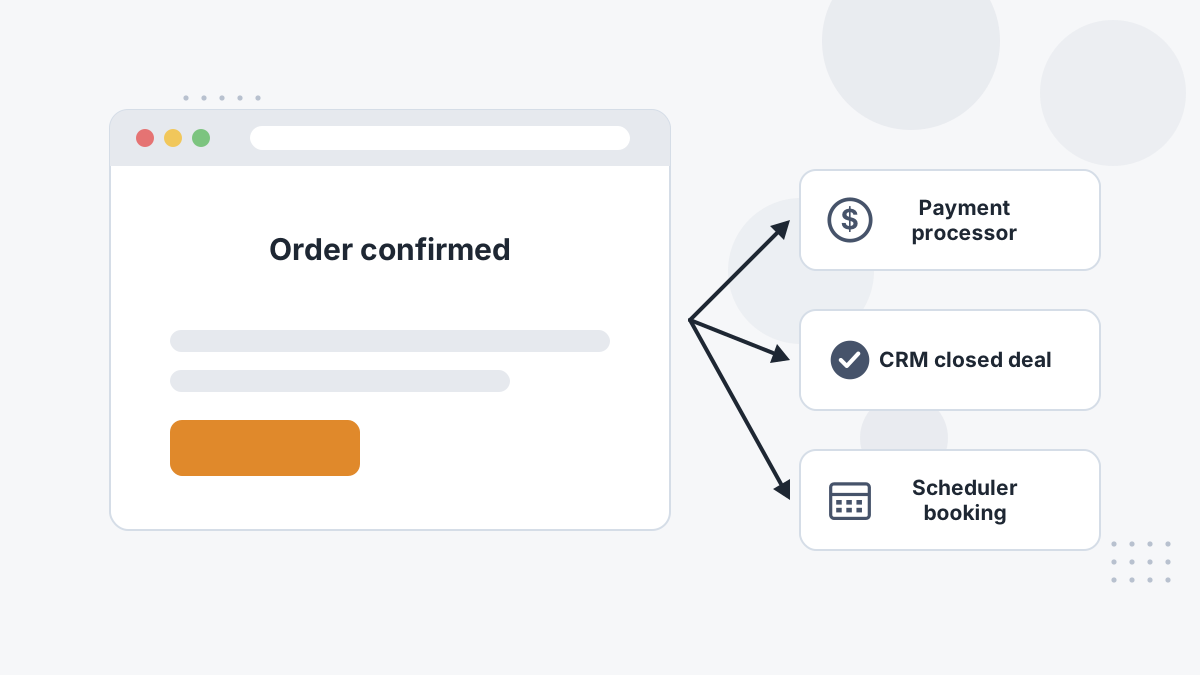
Here's the key difference from a pixel. A pixel only records a purchase if the buyer's browser loads the thank-you page and the script is allowed to run. Hyros instead receives conversions from your systems directly.
Integrations with tools like Shopify, Stripe, WooCommerce, Kajabi, ClickFunnels, Calendly and GoHighLevel report sales, bookings and closes to Hyros server-to-server. Ad blockers, iOS settings and closed tabs don't interfere, because the browser isn't involved at that step.
Why it matters to you: sales that happen on a call, by invoice, through a subscription renewal or on another device still reach Hyros. That's often where the biggest gaps in platform reporting hide. Our server-side tracking guide explains the general principle.
Step 4: Matching, Deterministic First
Hyros now has two things: a conversion with a customer identifier, and a library of prints with ad histories. It connects them.
Hyros says it prioritizes deterministic matches, where an exact identifier like the same email links the conversion to the print. It falls back to probabilistic matching, based on similar device and session signals, only when it has to, and treats those matches with lower confidence.
That order matters. Exact matches are what make cross-device, weeks-later attribution trustworthy. It's also why collecting an email early in your funnel improves Hyros's accuracy so much.
Step 5: Attribution and Reporting
Once a sale is matched to a journey, Hyros applies your chosen attribution model to decide how much credit each touch receives. You can look at first click, last click, or a custom weighting between first touch, assists and last touch.
From there, Hyros reports revenue by ad, ad set, campaign, platform and creative, along with LTV, cohorts and call metrics. Because the data is tied to people rather than sessions, repeat purchases months later still credit the ad that won the customer.
For a deeper look at the models, see Hyros attribution models, and for the reports themselves, Hyros reports explained.
Step 6: Sending Sales Back to Ad Platforms
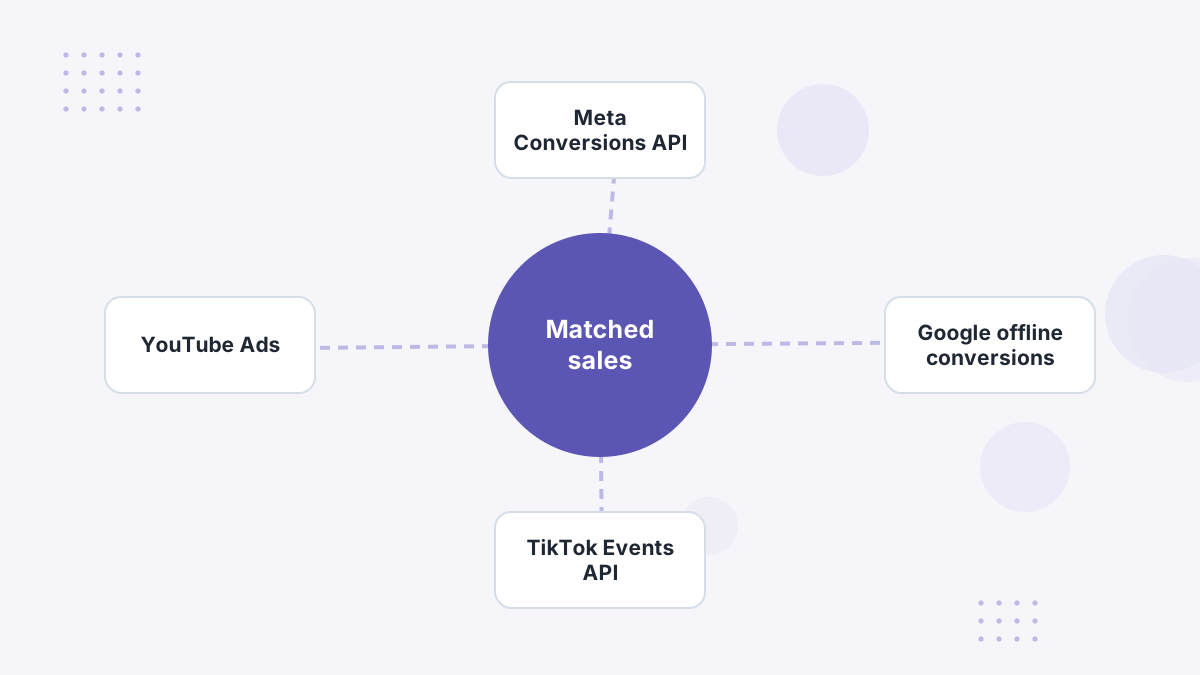
The final step closes the loop. Hyros sends its matched conversions to the ad platforms through their server-side channels, including Meta's Conversions API, Google's offline conversion imports and TikTok's Events API.
The ad platforms' algorithms decide who sees your ads based on who converts. If they only see the conversions their pixels caught, they optimize toward an incomplete picture. Feeding them the sales Hyros recovered gives them more real buyers to learn from.
Hyros calls this AI ad optimization, and it puts its data inside your ad manager so you can work in your usual workflow. Read more in Hyros AI ad optimization.
Print Tracking vs Pixel and Cookie Tracking
| Browser Pixel | Hyros Print Tracking | |
|---|---|---|
| Where conversions are recorded | Visitor's browser | Your checkout, processor or CRM, server-side |
| Identity | Cookies and platform login | First-party identifiers like hashed email and phone |
| Cross-device journeys | Often lost | Joined through the shared identifier |
| Ad blockers and iOS opt-outs | Block or limit tracking | Don't affect server-side conversion reports |
| Calls and offline closes | Not visible | Tracked through scheduler and CRM integrations |
| Whose view | One platform's | Every platform, de-duplicated |
Rivals point out that the building blocks (first-party data, IP and device signals, server-side events) are used by other tools too. That's fair. The value lies in how thoroughly Hyros connects every part of your funnel and how it prioritizes exact matches.
What Print Tracking Can't Do
No tracking method is perfect, and it helps to know the limits:
- It needs coverage. Pages without the script, or a checkout that isn't integrated, create blind spots.
- Anonymous buyers are harder. If a buyer never shares an email or phone until purchase, matching relies more on weaker signals.
- View-only influence is hard to see. Someone who watched a YouTube ad without clicking won't show a click ID. Modeling approaches like MMM estimate that differently.
- Numbers won't match Ads Manager. That's expected; see why Hyros and ad platforms differ.
Most of these come down to setup. The included setup team's job is to make sure every page and conversion source is connected.
Privacy and Consent
Hyros says print tracking is designed to work within privacy laws such as GDPR, CCPA and CPRA, and relies on first-party data that businesses collect with consent. It also lists SOC 2 and GDPR compliance on its site.
The practical point for you: compliance still depends on your implementation, your consent banner and your privacy policy. Make sure your site discloses tracking and that you have a lawful basis for the data you collect. Our cookie consent tracking guide covers the basics.
How Hyros Works FAQs
Is Hyros print tracking the same as fingerprinting?
Not exactly. Hyros prioritizes exact identifiers like hashed emails and uses device signals only as a lower-confidence fallback.
Do you need to replace the Meta pixel to use Hyros?
No. You keep your platform pixels. Hyros runs alongside them and sends its matched conversions to the platforms server-side.
How does Hyros track sales that happen on a call?
Through integrations with schedulers and CRMs, which report bookings and closed deals to Hyros so they can be matched to the original ad.
Does Hyros work without collecting emails?
It can, using click IDs and device signals, but accuracy is highest when your funnel captures an email or phone early.
See How Hyros Would Track Your Funnel
Book a demo and the team will map print tracking onto your exact pages, checkout and tools.
Book a Hyros Demo