If you've ever compared Facebook Ads Manager to your Shopify, Stripe or CRM numbers, you've probably seen them disagree. Sometimes Meta claims more sales than you made. Sometimes it misses sales you know came from its ads.
Both problems cost money. Over-reporting tempts you to scale ads that aren't profitable. Under-reporting tempts you to cut ads that are. Let's work out which one you have, why it happens and what to do about it.
Why Facebook's Numbers and Your Sales Don't Match
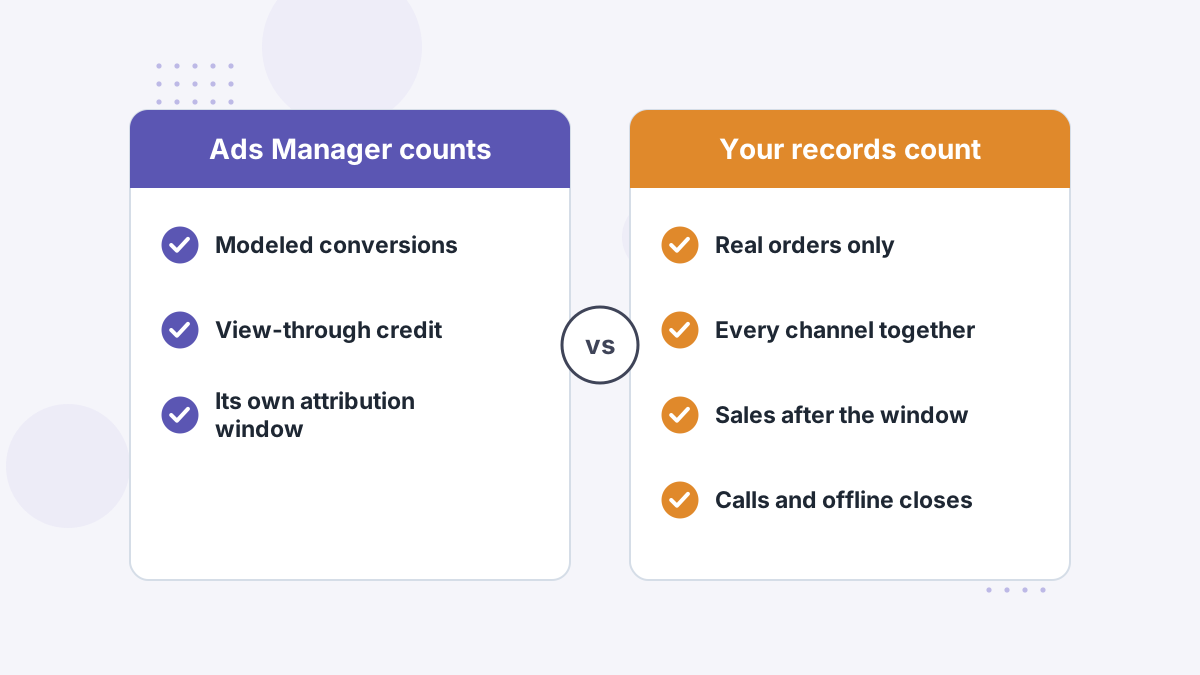
Meta and your store are answering different questions. Your store asks "did a sale happen?" Ads Manager asks "did a sale happen that we can credit to one of our ads, under our rules?"
Those rules include an attribution window, credit for people who only saw an ad, and statistical modeling to fill gaps it can no longer observe directly. Your store applies none of them.
So some disagreement is normal. The question is whether the gap is small and stable, or large enough that it's steering your budget in the wrong direction.
Over-Reporting vs Under-Reporting: Which Do You Have?
Start by comparing a recent week of Meta-reported purchases against real orders from Meta traffic. You'll usually land in one of two camps.
| Symptom | Likely Causes | Main Risk |
|---|---|---|
| Meta reports more sales than you received | View-through credit, duplicate events, overlap with other channels, modeled conversions | Scaling ads that look profitable but aren't |
| Meta reports fewer sales than you received | Lost browser signals, short windows, sales after calls or email, cross-device purchases | Cutting ads that are quietly driving revenue |
A Worked Example
Here's an illustration with made-up round numbers. Say Ads Manager reports 60 purchases last week. Your store shows 70 orders in total, and your UTM-tagged links show 38 orders arriving from Facebook traffic.
At first glance Meta looks generous: 60 claimed versus 38 tagged. But dig in and you might find 15 of those 60 are view-through credits, 5 are duplicates from a double-firing event, and 12 extra Facebook-driven buyers paid after a sales call that neither Meta nor your UTMs ever saw.
The lesson is that a single comparison rarely tells the full story. Break the gap into its causes before you act on it.
Many businesses have both problems at once: some campaigns over-credited, others under-credited. That's exactly why total numbers can look "close enough" while individual campaign decisions are badly wrong.
Cause 1: Privacy Changes and Lost Signals
Since Apple's App Tracking Transparency rollout with iOS 14.5, many iPhone users opt out of app tracking. Browsers have also tightened cookie rules, and ad blockers stop pixels from firing at all.
What this means is that Meta's pixel simply never sees a share of purchases. To compensate, Meta uses statistical modeling to estimate conversions it can't observe.
Why it matters to you: modeled conversions are estimates, not counted sales. They can be roughly right in aggregate and still wrong for a specific ad set. Our guide to iOS tracking changes explains the full impact.
Cause 2: Attribution Windows and View-Through Credit
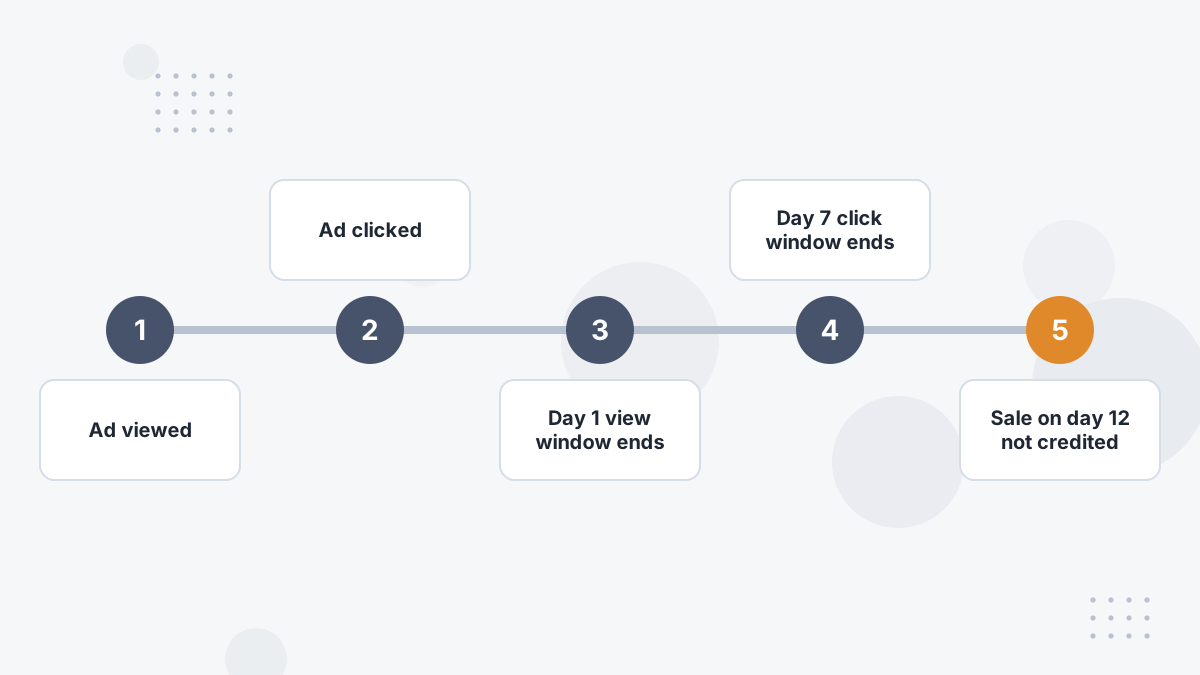
Meta's default attribution setting in 2026 credits a conversion to your ad if it happens within 7 days of a link click, 1 day of an engagement (Meta's "engage-through" credit, which replaced engaged-view), or 1 day of a view. Each part can cause trouble.
The 1-day view and engage-through parts credit people who saw or briefly engaged with your ad and bought anyway, perhaps because they'd already decided. That inflates results, especially for retargeting audiences full of existing customers.
The 7-day click limit cuts the other way. If your buyers usually take two or three weeks, sales that happen after day seven aren't credited to Meta at all.
The fix is to match your attribution setting to your real buying cycle and to compare "click only" views against your store data. Our Meta attribution settings guide walks through the options.
Cause 3: Double Counting Across Platforms
Every ad platform takes credit for any sale it touched within its window. If a buyer clicked your Google ad on Monday and your Facebook ad on Wednesday, both platforms will report that sale.
Add up the "conversions" across Meta, Google and TikTok and you'll often find more sales than you actually made. Each platform isn't lying; each is just grading its own homework.
This is the strongest argument for one independent source of truth that de-duplicates across channels. Our multi-touch attribution guide explains how credit can be shared fairly.
Cause 4: Pixel and Event Setup Errors
Plenty of attribution problems are plain technical mistakes. The usual culprits:
- Purchase events firing twice, for example on the thank-you page and on a page refresh.
- Pixel plus Conversions API without deduplication, so Meta counts the same order twice.
- Missing values or currency, which weakens Meta's ability to optimize for higher-value buyers.
- Multiple pixels on the same site splitting your data.
- Events on the wrong page, such as "Purchase" firing at checkout start.
These are worth fixing first because they're entirely within your control. Our Facebook pixel troubleshooting guide shows how to check each one.
Cause 5: Journeys Meta Can't See
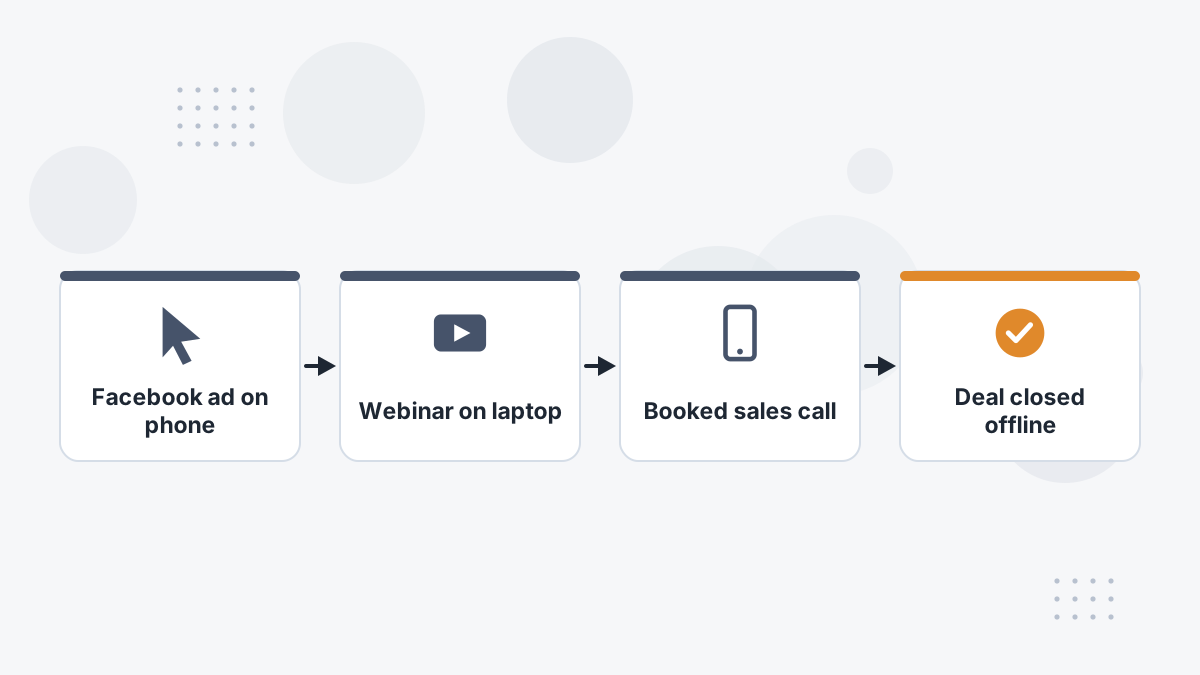
Some of your best sales never touch a page with Meta's pixel at the moment of purchase. A lead might click an ad on mobile, watch a webinar on a laptop days later, book a call and pay by invoice.
Meta sees the click. It doesn't see the call, the invoice or the laptop session unless you send that data back. So the campaign that started your most valuable relationships can look like a failure.
This is the biggest gap for coaches, B2B sellers and anyone with a sales team. It's where server-side matching and offline conversion feedback matter most. See how to track sales calls back to ads.
What Not to Do About the Gap
When numbers disagree, the instinct is to pick a side and move on. These are the shortcuts we'd avoid:
- Applying a flat "discount" to Meta's numbers. Halving every result hides the fact that some campaigns are under-credited while others are over-credited.
- Judging retargeting on view-through results. Retargeting audiences are full of people who were already going to buy. Click-only views tell you more.
- Killing prospecting ads on 7-day results alone. If your buying cycle is longer, look at what those audiences buy over 30 days or more.
- Adding a second tracking tool on top of a broken setup. Fix duplicate and missing events first, or every tool will inherit the errors.
- Changing attribution settings mid-test. Compare like with like, or your before-and-after numbers won't mean anything.
How to Fix Facebook Attribution, Step by Step
- Audit your events. Use Events Manager and Meta's Pixel Helper extension to confirm each event fires once, on the right page, with value and currency.
- Add the Conversions API. Send purchase and lead events server-side, with a shared event ID so Meta can deduplicate against the pixel. See our Conversions API guide.
- Improve match quality. Pass hashed customer details such as email and phone where you have consent, so Meta can match more events to users.
- Review your attribution setting. Compare click-only results with the default (click, engage-through and view) against your real orders.
- Tag every link with UTMs. Consistent UTM parameters let you check Meta's claims in your own analytics.
- Connect your CRM or checkout. Send offline closes and call outcomes back to Meta where possible.
- Reconcile weekly. Compare platform numbers against real revenue and watch the trend, not just one week.
These steps narrow the gap. They won't eliminate double counting across platforms or give you a single cross-channel view, because Meta can only ever report on Meta.
When You Need an Independent Tracker
Fixing your pixel and adding the Conversions API is worth doing for everyone. But an independent attribution tool becomes worth paying for when:
- You spend meaningfully on two or more ad platforms and need one de-duplicated view.
- Your buyers take longer than a week to purchase.
- Sales close on calls, by invoice or through a CRM.
- You're making scaling decisions every week and can't afford to get them wrong.
The reason comes down to scope. Meta can only report what Meta touched, using Meta's rules. Google does the same. An independent tracker sits above all of them, sees every channel and your real orders, and credits each sale once.
That's the problem Hyros was built for. It matches sales to their true source using first-party data, tracks calls and offline closes, and sends those matched conversions back to Meta so its algorithm optimizes on real buyers. Learn how Hyros works, or compare options in our best Facebook ads tracking software roundup.
If you only run Meta, spend modestly and sell with instant checkout, a clean pixel plus Conversions API setup may be all you need for now.
Facebook Ads Attribution FAQs
Why does Facebook show purchases when there are no sales?
Usually a misfiring Purchase event, view-through credit, or modeled conversions. Check that Purchase only fires on a real order confirmation, then compare click-only results.
Why is Facebook under-reporting sales?
Lost browser signals from iOS and ad blockers, purchases after the attribution window, and sales that happen on calls or other devices.
Does the Conversions API fix attribution?
It recovers events the pixel misses and improves matching, but it still only reports Meta's view and still uses Meta's attribution rules.
Should you trust Facebook or Google Analytics?
Neither alone. GA4 also relies on browser tracking. An independent server-side tool, or careful reconciliation against real orders, is more reliable.
Stop Guessing Which Ads Make Money
See how Hyros reconciles Meta, Google and TikTok against your real sales on a demo.
Book a Hyros Demo