Shopify stores were hit hard by privacy changes. Meta and TikTok lost visibility of many purchases, and Shopify's own reports can't connect a buyer who clicked on their phone and paid on their laptop.
Hyros is one way to close that gap. Here's how it works with Shopify, what it adds, how to install it, and whether your store is the kind that benefits.
Does Hyros Work With Shopify?
Yes. Hyros has a dedicated app on the Shopify App Store. According to Hyros, you paste your store link inside Hyros, click install, and the connection is made in seconds, with the tracking script installed automatically and sales syncing through the Shopify API.
Hyros announced in 2025 that all Shopify plans are supported. That removes one of the older friction points, when Shopify setups needed more manual script work.
What this means for you: getting orders into Hyros is easy. The bigger setup work for most stores is connecting ad accounts, email and any non-Shopify parts of the funnel.
Why Shopify Stores Lose Attribution
Shopify's analytics and the ad platforms' pixels each have blind spots:
- Cross-device buyers. Shopify has no built-in way to recognize the same person across devices, so a mobile click and a desktop purchase look unrelated.
- In-app browsers. Clicks inside the Meta or TikTok apps open in an in-app browser, which doesn't always pass referral information the way a normal visit does.
- Pixel loss. iOS opt-outs and ad blockers stop platform pixels from recording some purchases.
- Double counting. Each ad platform claims any sale it touched, so totals across Meta, Google and TikTok often exceed your real orders.
Hyros publishes its own figures claiming the major ad platforms under-report Shopify conversions by roughly a third compared with its server-side tracking. Treat that as the vendor's claim, but the direction matches what most store owners see. Our Shopify attribution report guide explains Shopify's own numbers.
What Hyros Adds for a Shopify Store
One De-Duplicated View
Every order credited once, across Meta, Google, TikTok, YouTube and more.
Cross-Device Matching
Identity-based matching links mobile clicks to desktop purchases through details like email.
Server-Side Events
Add-to-carts, checkouts, purchases and lifetime value captured server-side.
Feedback to Ad Platforms
Matched purchases sent back to Meta, Google and TikTok to improve their targeting.
LTV by Source
See which ads win customers who reorder, not just first-order ROAS.
Beyond Shopify
Track subscriptions, a second checkout or a coaching offer in the same tool.
The last point is easy to overlook. Plenty of brands run a Shopify store alongside a subscription app, a wholesale form or a high-ticket program. Hyros can track all of it in one place. See how Hyros works.
Installing Hyros on Shopify
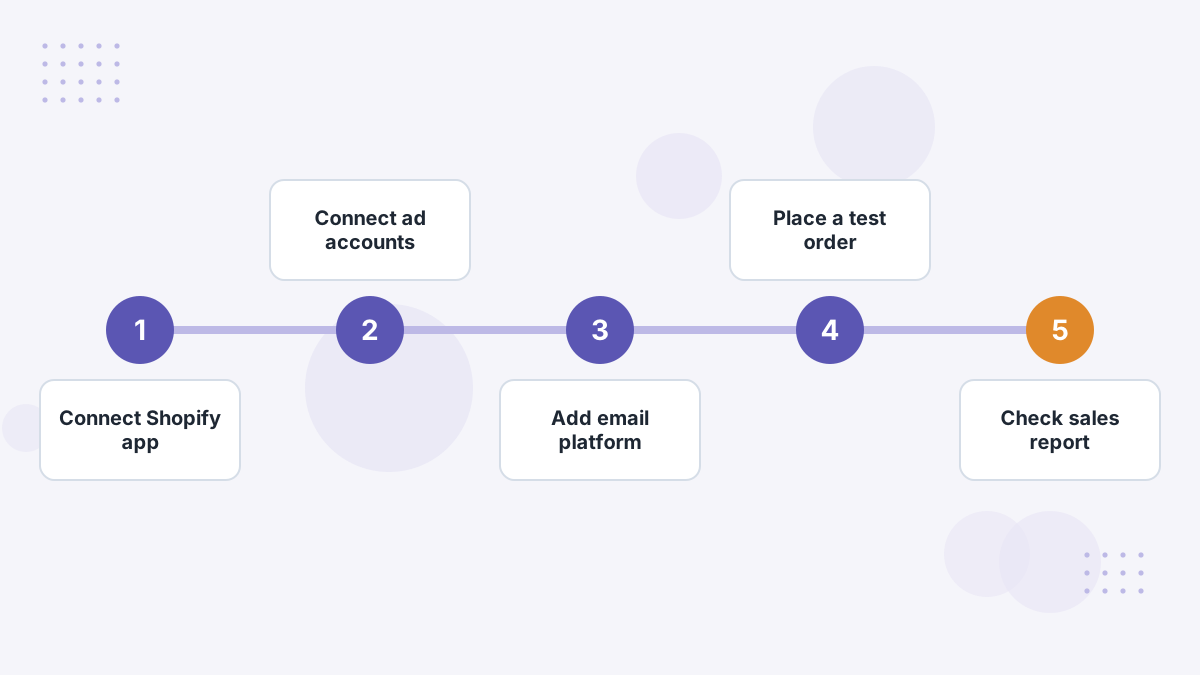
- Connect the Shopify app. In Hyros, open the Shopify integration, paste your store link and approve the app. The tracking script installs automatically.
- Connect your ad accounts. Link Meta, Google, TikTok and any others so Hyros can pull spend and send conversions back.
- Connect email and SMS. Klaviyo is the most common for Shopify stores. See our Klaviyo integration guide.
- Place a test order. Hyros's documentation recommends completing a test checkout, then checking the sales reporting area for the transaction.
- Check landing pages off Shopify. If you run ads to pages hosted elsewhere, add the Hyros script there too.
- Turn on conversion feedback once tracking is verified. See AI ad optimization.
Hyros's setup team can help with any of these. Our full setup guide covers the general onboarding order.
Hyros vs Shopify's Own Attribution Reports
Shopify includes marketing reports that attribute sales to channels using its own model. They're free and useful for a quick view.
| Shopify Reports | Hyros | |
|---|---|---|
| Cost | Included with Shopify | Paid, by tracked revenue |
| Cross-device journeys | Limited | Identity-based matching |
| Ad-level revenue | Channel and campaign, depending on UTMs | Ad, ad set, campaign and creative |
| Spend and ROAS | Not natively combined with every ad platform | Spend pulled from connected ad accounts |
| Sends data to ad platforms | Through separate channel apps | Matched conversions sent back |
| Non-Shopify revenue | No | Yes |
Our take: Shopify's reports are a good free baseline. Hyros is worth adding when your ad spend is large enough that ad-level accuracy changes your decisions.
Hyros vs Shopify-Native Attribution Tools
Several attribution tools are built specifically for Shopify, including Triple Whale and Polar Analytics. They bundle attribution with store dashboards, profit metrics and business intelligence.
Hyros is narrower but deeper on tracking itself, and it works beyond Shopify. If you want an all-in-one store analytics suite, a Shopify-native tool may suit you. If your priority is trustworthy ad-level revenue across many platforms and funnels, Hyros is the specialist.
Compare them directly: Hyros vs Triple Whale, Hyros vs Polar Analytics and Hyros vs Elevar, or see our best attribution software for Shopify.
Which Shopify Stores Should Use Hyros?
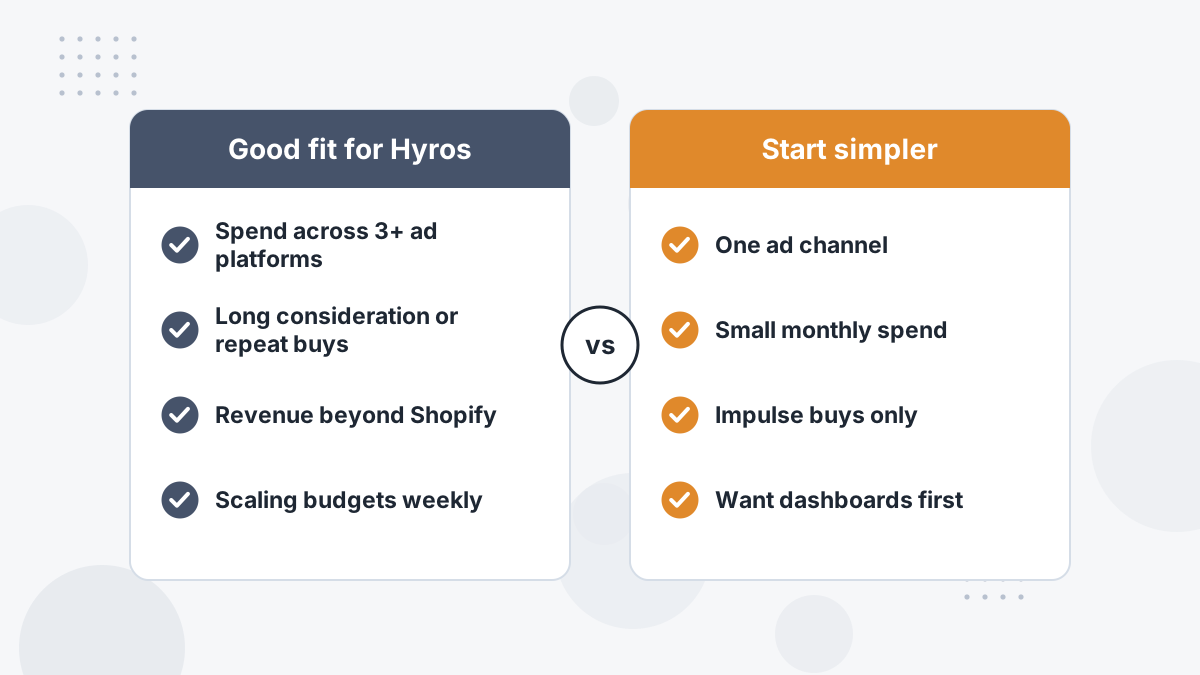
Hyros earns its place in a Shopify store when one or more of these are true:
- You spend meaningfully across three or more ad platforms.
- Buyers take days or weeks to decide, or come back to reorder.
- You sell through more than the Shopify checkout.
- You make weekly scaling decisions and need ad-level confidence.
If you spend modestly on one platform and most purchases happen in the same session, start with Shopify reports and a solid Conversions API setup. Revisit Hyros as spend grows; its entry tier and revenue-based pricing mean you can start small. See Hyros pricing.
Hyros for Shopify FAQs
Is there a Hyros Shopify app?
Yes. Hyros has a dedicated Shopify app that installs its tracking script and syncs sales through the Shopify API.
Does Hyros support all Shopify plans?
Hyros announced in 2025 that all Shopify plans are supported.
Will Hyros slow down a Shopify store?
The tracking script is lightweight and installed through Shopify's app system. As with any script, check your store speed after installing.
Can you use Hyros alongside the Meta sales channel?
Yes, but coordinate conversion feedback so purchases aren't sent to Meta twice without deduplication.
See What Hyros Finds in Your Store's Data
Book a demo to see how Hyros would attribute your Shopify orders across every ad platform.
Book a Hyros Demo